Sofascore’s New Home Screen: A Smarter, Faster Way to Follow Sports
Sofascore app just got a major redesign – and it’s one of our biggest updates yet. The new home screen is now cleaner, smarter, and designed to make following your favorite sports easier than ever.
No matter which sport you are following, and how deep, everything is now just one tap away.

All sports, one screen
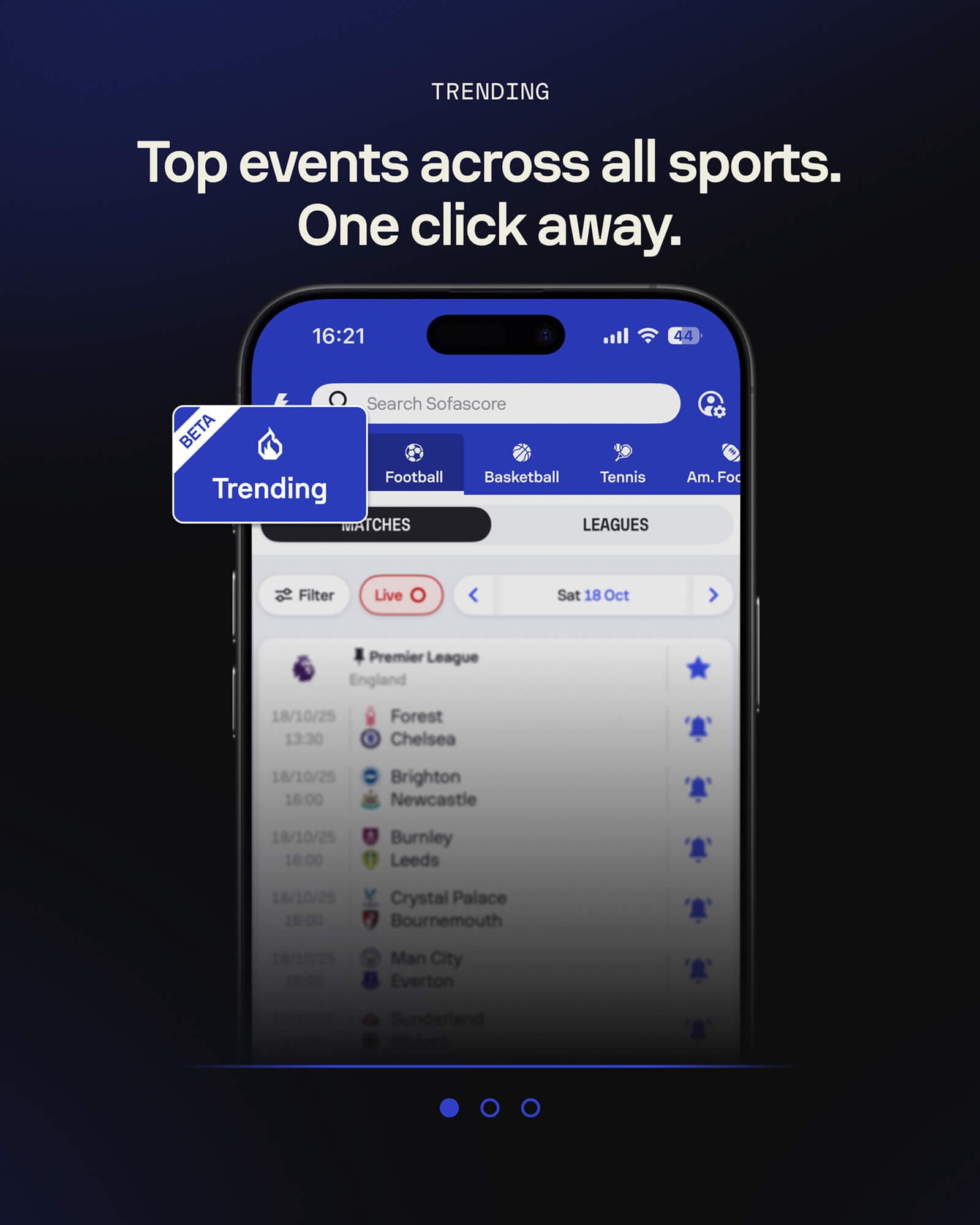
The top bar now lets you switch between all sports instantly. Football, basketball, tennis, or any other – simply tap the icon and you’re there. No extra steps, no endless scrolling.
And if you want to see what the world is watching, the brand-new Trending tab is your shortcut to the most popular live matches across all sports.

Your leagues, your way
Fans have their favorites, and now Sofascore’s home screen adapts to that. You can pin the leagues that matter most to you – from the Premier League and LaLiga to your local competitions – and even reorder them however you like.
We’ve also moved the Leagues button to the top for easier access, right next to Matches, so you can jump between the two in seconds.

Smarter filters for a faster experience
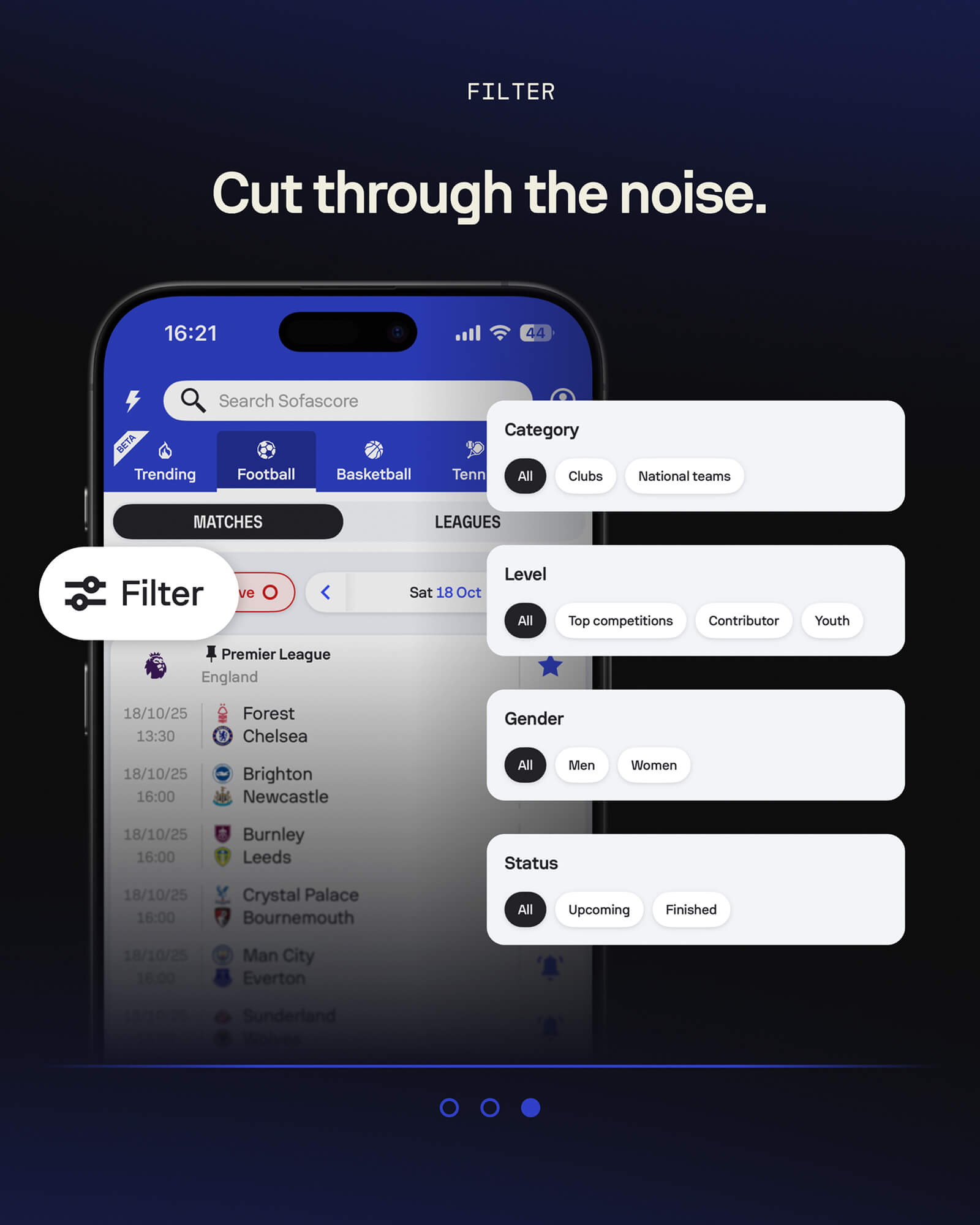
To help you find exactly what you want, the new Filter button now gives you full control.
You can sort matches by:
- Category – Clubs or National Teams
- Level – Top Competitions, Contributor, or Youth
- Gender – Men or Women
- Status – Upcoming or Finished
Because sometimes, you just want to see what’s next for your favorite team, or quickly check how the last match ended.

Clean bottom bar, optimized for daily use
We’ve also made the bottom navigation bar more visible and useful. You’ll now always see:
Sport, Favourites, Feed, and Fantasy (where available) – all neatly arranged for faster access.
It’s a small change that makes daily use much smoother, especially when switching between sports or exploring your favorite teams.

Quick Links: Your shortcut to everything
Another new addition is the Quick Links section – a personal control panel that helps you jump straight to what matters most. From Notifications and Transfers to FIFA, UEFA, ATP, WTA or Rugby Union rankings, you can organize your app around your interests.
Because no two sports fans are the same. And now, no two Sofascore setups have to be either.

A new era of personalization
This redesign isn’t just about looks. It’s about giving you more control and comfort – whether you’re tracking one sport or ten.

The new home screen is now live worldwide. Update your Sofascore app today and see how simple and personal your sports world can feel.
Happy Birthday, Sofascore! 15 Sports Facts Featuring the Number 15
2025年12月4日Sofascore Turns 15: Celebrating 15 Years of the Platform Fans Love
2025年12月3日Numbers Don’t Lie: The Defensive Midfielders Showdown
2025年12月2日LaLiga Matchday 14 Review
2025年12月2日Premier League Fantasy Picks: Round 14
2025年12月2日Premier League Matchday 13 Review
2025年12月1日ATP and WTA Rankings vs UTR Rating: Comparing the Most Important Tennis Lists
2025年12月1日Happy Birthday, Sofascore! 15 Sports Facts Featuring the Number 15
2025年12月4日Sofascore Turns 15: Celebrating 15 Years of the Platform Fans Love
2025年12月3日Numbers Don’t Lie: The Defensive Midfielders Showdown
2025年12月2日LaLiga Matchday 14 Review
2025年12月2日Premier League Fantasy Picks: Round 14
2025年12月2日Premier League Matchday 13 Review
2025年12月1日ATP and WTA Rankings vs UTR Rating: Comparing the Most Important Tennis Lists
2025年12月1日Sofascore’s New Home Screen: A Smarter, Faster Way to Follow Sports
Sofascore app just got a major redesign – and it’s one of our biggest updates yet. The new home screen is now cleaner, smarter, and designed to make following your favorite sports easier than ever.
No matter which sport you are following, and how deep, everything is now just one tap away.
All sports, one screen
The top bar now lets you switch between all sports instantly. Football, basketball, tennis, or any other – simply tap the icon and you’re there. No extra steps, no endless scrolling.
And if you want to see what the world is watching, the brand-new Trending tab is your shortcut to the most popular live matches across all sports.
Your leagues, your way
Fans have their favorites, and now Sofascore’s home screen adapts to that. You can pin the leagues that matter most to you – from the Premier League and LaLiga to your local competitions – and even reorder them however you like.
We’ve also moved the Leagues button to the top for easier access, right next to Matches, so you can jump between the two in seconds.
Smarter filters for a faster experience
To help you find exactly what you want, the new Filter button now gives you full control.
You can sort matches by:
- Category – Clubs or National Teams
- Level – Top Competitions, Contributor, or Youth
- Gender – Men or Women
- Status – Upcoming or Finished
Because sometimes, you just want to see what’s next for your favorite team, or quickly check how the last match ended.
Clean bottom bar, optimized for daily use
We’ve also made the bottom navigation bar more visible and useful. You’ll now always see:
Sport, Favourites, Feed, and Fantasy (where available) – all neatly arranged for faster access.
It’s a small change that makes daily use much smoother, especially when switching between sports or exploring your favorite teams.
Quick Links: Your shortcut to everything
Another new addition is the Quick Links section – a personal control panel that helps you jump straight to what matters most. From Notifications and Transfers to FIFA, UEFA, ATP, WTA or Rugby Union rankings, you can organize your app around your interests.
Because no two sports fans are the same. And now, no two Sofascore setups have to be either.
A new era of personalization
This redesign isn’t just about looks. It’s about giving you more control and comfort – whether you’re tracking one sport or ten.
The new home screen is now live worldwide. Update your Sofascore app today and see how simple and personal your sports world can feel.